What's new
  • The default language of any content posted is English.
    Do not create multi-accounts, you will be blocked! For more information about rules, limits, and more, visit the Help page.
    Found a dead link? Use the report button!
Smart School : School Management System [QDOCS]

NULLED Smart School : School Management System [QDOCS] 7.2.0 NULLED

make sure your attendance taking timing and attendance in and out time middle of two timings (eg: suppose you are taking attendance 9.00A.M then your attendance timing should be 8.45A.M and out is grater than 9.30A.M(in-8.45A.M 9.00A.M 9.30A.M
Woaw woaw you very helpful , thank you so so much buddy.
 
Reacted by:
when you apply the update it prompts you to enter your evanto username and password. You get this pop-up especially when you remove the alert from the main system header and layout
Post automatically merged:

Anyone with a working null version
disable the code inside updater.php by turn into comment and enjoy
 
Reacted by:
  • Like
Reactions: jac
Hi Everyone first thanks alot for sharing the nulled version thanks alot to help humanity to get best scripts to help their businesses.
I have a little issues i installed the latest version 7.2 for demo training for my staff but the issues is the system is loaded very slow i try to find if there's any remote url or something but the code is clean i try to install it locally to figure out the issue is the hosting the Reason for load slow in the localhost without internet connection it's loaded fast little than on the hosting i change the hosting to other hosting provider but i get same result very very slow loaded i try to use any script to see if the hostings is the reason but not if i work with any script it's work and loaded very fast but smart school loaded very slow very slow can you imagine the login process takes over 1 minutes to load the dashboard could any one help me with this 🙏😇😇
 
Reacted by:
USE LOCALHOST OWN SERVER XAMPP OR WAMPP USE SSD NOT USE HARD DRIVE
Post automatically merged:

Hi Everyone first thanks alot for sharing the nulled version thanks alot to help humanity to get best scripts to help their businesses.
I have a little issues i installed the latest version 7.2 for demo training for my staff but the issues is the system is loaded very slow i try to find if there's any remote url or something but the code is clean i try to install it locally to figure out the issue is the hosting the Reason for load slow in the localhost without internet connection it's loaded fast little than on the hosting i change the hosting to other hosting provider but i get same result very very slow loaded i try to use any script to see if the hostings is the reason but not if i work with any script it's work and loaded very fast but smart school loaded very slow very slow can you imagine the login process takes over 1 minutes to load the dashboard could any one help me with this 🙏😇😇
USE SSD OWN LOCALHOST XAMPP OR WAMPP
 
Reacted by:
USE LOCALHOST OWN SERVER XAMPP OR WAMPP USE SSD NOT USE HARD DRIVE
Post automatically merged:


USE SSD OWN LOCALHOST XAMPP OR WAMPP
And my own laptop has NVME Storage but still slow i thinking the issues not from the traffic the issues from the code response when I'm in the dashboard and i want to native to any sections Ex to Students it's takes 40s to response and native me
Post automatically merged:

USE LOCALHOST OWN SERVER XAMPP OR WAMPP USE SSD NOT USE HARD DRIVE
Post automatically merged:


USE SSD OWN LOCALHOST XAMPP OR WAMPP
Could i pm you to show you the issues if you can help and you don't mind Sr 😇🙏
 
Reacted by:

Smart School : School Management System v7.2.0 Nulled

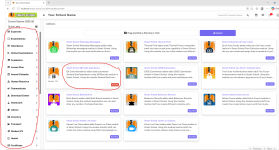
Everything is fine, but I cannot add any add-ons; after uploading, they appear under System Settings > Add-ons, but they are not being added to the sidebar.If someone could help with how to solve this problem.

1787580693194.png

 
Reacted by:

Smart School : School Management System v7.2.0 Nulled

Everything is fine, but I cannot add any add-ons; after uploading, they appear under System Settings > Add-ons, but they are not being added to the sidebar.If someone could help with how to solve this problem.​

View attachment 58454

ENABLE IT IN THE "sidebar_menus" TABLE IN THE DATABASE, YOU ENABLE EVEN THE OTHER ADDONS THAT ARE NOT VISIBLE ON THE SIDE MENU. BUT MOSTLY ALL OF THEM WILL BE VISBLE ON THE QUICK LINKS JUST ON TOP OF THE FRONT OFFICE SIDE MENU
 
Reacted by:
Top