- Messages
- 55
- Reactions
- 43
In some countries workupload is not opening use web proxy to download.
Reacted by:


![Smart School : School Management System [QDOCS]](/data/resource_icons/0/628.jpg?1660633990)

In some countries workupload is not opening use web proxy to download.

please upload in mega !In some countries workupload is not opening use web proxy to download.
Download use this link to download from proxy and enter password copy from original uploaderplease upload in mega !

Thank you for sharing as well, does anyone have the addons nulled ,kindly share pleasesmart school addon bundle pack mega link *** Hidden text: cannot be quoted. ***
have you already nulled the addons or we dont need to null it once the system is already operationalonline course, gg meet, zoom addon don't display on sidebar menu???

just put 0 betwen SSLK ( ) and the display of alert will get offPlease can yo guide me to that. I tried and still showing. Thanks.
the addons here do we need to null it or we can just use it by uploading the files in therejust put 0 betwen SSLK ( ) and the display of alert will get off
you may find it in header.php

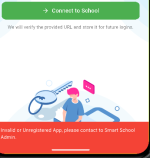
build the app yourself and put the web url. it will skip thisplease help how to solve this problem
you need to null it.the addons here do we need to null it or we can just use it by uploading the files in there
Please note that:the addons here do we need to null it or we can just use it by uploading the files in there
alright sure thanks , do you have them already nulled ? if you have kindly share it with mebuild the app yourself and put the web url. it will skip this
Post automatically merged:
you need to null it.
I do not sorry. I am pretty sure some have it nulled but will they share it ? or ask one of the administrator. you may be luckyalright sure thanks , do you have them already nulled ? if you have kindly share it with me
Alright sure thank you for your reply, i will look into that as well.I do not sorry. I am pretty sure some have it nulled but will they share it ? or ask one of the administrator. you may be lucky
did you configure qr code attendance setting?When trying to take attendance via QR code in the demo, the system shows the following message: “Attendance settings not configured”.
Does anyone no how to fix this error it's urgent
make sure your attendance taking timing and attendance in and out time middle of two timings (eg: suppose you are taking attendance 9.00A.M then your attendance timing should be 8.45A.M and out is grater than 9.30A.M(in-8.45A.M 9.00A.M 9.30A.MWhen trying to take attendance via QR code in the demo, the system shows the following message: “Attendance settings not configured”.
Does anyone no how to fix this error it's urgent