Thank work perfect on joomla 6.0.4JSitemap Pro 4.29 – 24/03/2026
- New Matomo Analytics integration in JSitemap Pro backend with full stats dashboard (charts, maps, tables, and traffic sources)
- New Matomo Analytics integration in frontend Analytics view, including service selection in menu items
- New dedicated Matomo Analytics parameters: Matomo URL and Matomo ID Site, now separated from tracking code parameters
- New Matomo API request mode support: POST/AUTO/GET with advanced token_auth handling
- Improved fallback handling and backward compatibility for existing Matomo configurations
- Updated Google PageSpeed data method with conditional proxy support from component settings, while preserving legacy default behavior
- Update for Joomla 6 framework compatibility and PHP compatibility improvements for release 4.29

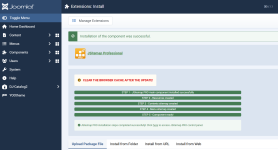
intalled on for only one j5 projets, other just show success message, but vers remain 4.29. Who knows what to do?JSitemap Pro 4.30 – 24/05/2026
- New Markdown Pages for AI Agents – Convert any page to clean Markdown at .md URLs for AI systems and chatbots
- New automatic HTML to Markdown conversion with content extraction, noise removal, and YAML frontmatter
- New configurable XPath content selectors with 16 default patterns for all Joomla components
- New meta tag injection for AI discovery – Automatically adds alternate link tags for Markdown versions
- Improved content extraction for SP Page Builder and custom components

Appreciate it. Your nulled files installed greatfullyJSitemap Pro 4.30 ( nulled, for Joomla 4-5-6)
View attachment 57639 View attachment 57640
*** Hidden text: cannot be quoted. ***


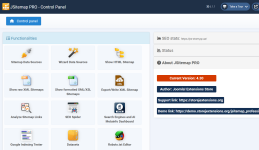
try a fresh install maybe?I installed over version 4.29. The usual installation progress screen wasn't displayed. I received a message indicating a successful installation. However, the component panel still shows the previous version as 4.29.

how you managed to do this? i compared the files with files from one other source, but they seems to be the same exept the Mysql.php...You can even make a website from scratch.
But I went a different route. I found a corrected installer file, replaced it in the component, installed it and got a working version 4.30.
Replaced the installscript.php file with the one attached herehow you managed to do this? i compared the files with files from one other source, but they seems to be the same exept the Mysql.php...
Thank you very much! It worked!Replaced the installscript.php file with the one attached here

 NOT NULLED
Thanks Dano
JSitemap Pro 4.31 – 15/06/2026
- Updated ChatGPT image generation to the new OpenAI Images API with support for the gpt-image-* model family
- New configurable image model selector (gpt-image-2, gpt-image-1.5, gpt-image-1, gpt-image-1-mini)
- New expanded image size options up to 4K (1024x1024, 1536x1024, 1024x1536, 2048x2048, 2048x1152, 3840x2160, 2160x3840)
- Added new ChatGPT models GPT-5.3, GPT-5.4, GPT-5.4 Mini, GPT-5.4 Nano and GPT-5.5
- Added new Gemini models
for the update
Is there still a problem when you update, display success, but the version still previous?JSitemap Pro 4.31 – 15/06/2026
Patch for installer
*** Hidden text: cannot be quoted. ***
I have test it on several website.Is there still a problem when you update, display success, but the version still previous?
@Romanych can you do your magic trick again, please?
JSitemap Pro 4.31 – 15/06/2026
- Updated ChatGPT image generation to the new OpenAI Images API with support for the gpt-image-* model family
- New configurable image model selector (gpt-image-2, gpt-image-1.5, gpt-image-1, gpt-image-1-mini)
- New expanded image size options up to 4K (1024x1024, 1536x1024, 1024x1536, 2048x2048, 2048x1152, 3840x2160, 2160x3840)
- Added new ChatGPT models GPT-5.3, GPT-5.4, GPT-5.4 Mini, GPT-5.4 Nano and GPT-5.5
- Added new Gemini models
Did you try this : https://nullcave.club/threads/jsitemap-pro.739/post-110887 ?@Romanych can you do your magic trick again, please?