

What's new
  • The default language of any content posted is English.
    Do not create multi-accounts, you will be blocked! For more information about rules, limits, and more, visit the Help page.
    Found a dead link? Use the report button!

NULLED Flussonic 25.03

Messages
40
Files
5
Reactions
144
I didn’t think this topic would be of interest to anyone on this forum, but I saw a request and decided to share. The latest version of Flussonic (version 25.03).

🌐 Flussonic: A Powerful Video Streaming Solution


Flussonic is a professional software solution for video streaming that supports both live and archive video streams with scalability. It’s perfect for large media platforms, TV channels, and companies working with real-time video content.


🚀 Key Features of Flussonic


  1. Support for Multiple Formats
    Flussonic supports a wide range of video codecs and streaming protocols, including HLS, RTMP, MPEG-DASH, and more. This allows seamless integration with different sources and platforms without the need for additional software.
  2. Scalability
    Flussonic is designed for both small and large systems. It scales effortlessly, ensuring excellent performance even with high traffic volumes.
  3. Management and Monitoring
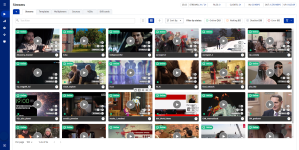
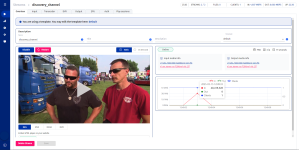
    The intuitive web-based admin panel lets you easily configure stream settings, monitor system health, track server performance, and assess stream quality. This simplifies management and allows for quick issue resolution.
  4. Recording and Archiving
    Flussonic enables video stream recording for later playback, creating content archives. You can organize these recordings into directories and grant access to viewers when needed.
  5. Security
    Built-in security features include protection against unauthorized access, stream encryption, and integration with content protection protocols (e.g., DRM).

🛠️ How to Install Flussonic


  1. Easy Installation
    Installing Flussonic is quick and simple. Just run the installation script on a supported Linux server. The system will automatically set up all the required components.
  2. Updates and Support
    Flussonic is regularly updated with new features and bug fixes. Automatic update functionality is available and can be configured or disabled as needed.
  3. Backup
    Flussonic allows you to set up automatic backups of your data and configuration. This ensures system safety and easy recovery in case of a failure.

🧩 Flexibility and Customization


Flussonic offers numerous configuration options, enabling you to tailor the system to meet your business needs. You can adjust video parameters, network settings, security features, and more to enhance stream quality and stability.


💡 Advantages of Flussonic


  • Low Latency: Ideal for applications requiring minimal video delay.
  • Multi-Protocol Streaming: Stream video content across multiple protocols simultaneously.
  • High Fault Tolerance: Designed to handle high loads and ensure continuous operation.

🎯 Applications of Flussonic


Flussonic can be used in various fields:


  • Telecommunications: For creating IPTV and OTT services.
  • Media Companies: For broadcasting live events and recording programs.
  • Educational Institutions: For organizing online courses and lectures.
  • Esports Organizations: For streaming tournaments and gaming broadcasts.

15-03-2025_12-29-50.png15-03-2025_12-50-13.png
15-03-2025_13-52-58.png15-03-2025_13-54-44.png

To install, unpack and run the installation script: bash flussonic. Choose option 1 for installation, and the script will add entries to the hosts file. Once the installation is complete, the script will provide a link to the Flussonic admin panel. If you had a previous version of Flussonic installed, you should first choose option 2 during installation, which will remove the old version and all traces of Flussonic from the system. Don’t forget to back up your /etc/flussonic/flussonic.conf before doing this.

After the previous version of Flussonic is removed, you can proceed with the installation by selecting option 1.

 
Top-liked message: 78
Flussonic is not specifically a webcam RTC script. It is a media server that supports multiple streaming protocols, including WebRTC, for real-time video streaming. You can use Flussonic to manage and distribute WebRTC streams, including webcam video, but it is not a dedicated RTC script.
inn your zip all files in .deb format , how I can use it ? do you have a documentation for installationn on live hosting ?
 
saintharbor 's signature
Reacted by:
  • Like
Reactions: dagtkrus and almaznak
inn your zip all files in .deb format , how I can use it ? do you have a documentation for installationn on live hosting ?
In the zip archive, you should find the Flussonic_Installation_Guide.md file. This is the installation guide for Flussonic, which includes detailed steps for installation on a live hosting server. You can open this file to follow the instructions specific to setting up Flussonic on your server.
 
Reacted by:
  • Like
Reactions: dagtkrus and almaznak
I don’t personally use Wowza, but Flussonic covers a wide range of tasks and is an all-in-one solution for video streaming, channels, and cameras. What features in Wowza are you looking for that Flussonic doesn't offer?
Just curious to try :)

So, it can say that Flussonic better than Wowza?
 
alex2k 's signature
Reacted by:
  • Like
Reactions: almaznak
Just curious to try :)

So, it can say that Flussonic better than Wowza?
Flussonic excels in performance, low latency, and support for modern streaming technologies, while Wowza is a more conventional choice for standard streaming tasks. If you need a high-performance, low-latency, and flexible media server, Flussonic is the better option.
 
If I need to install on 2-3 servers, how do I activate several servers without internet?
There is an older version available, "Flussonic 23.12 OffLine" ($100)
This version will not work offline. At least not until you run it for the first time with an internet connection. Try launching it with the internet on first, then try again with it off if that option works for you.

View hidden content is available for registered users! Unlock
 
Reacted by:
  • Like
Reactions: grunt and almaznak
is this works also with .mpd streams links ?
Post automatically merged:

I didn’t think this topic would be of interest to anyone on this forum, but I saw a request and decided to share. The latest version of Flussonic (version 25.03).

🌐 Flussonic: A Powerful Video Streaming Solution


Flussonic is a professional software solution for video streaming that supports both live and archive video streams with scalability. It’s perfect for large media platforms, TV channels, and companies working with real-time video content.


🚀 Key Features of Flussonic


  1. Support for Multiple Formats
    Flussonic supports a wide range of video codecs and streaming protocols, including HLS, RTMP, MPEG-DASH, and more. This allows seamless integration with different sources and platforms without the need for additional software.
  2. Scalability
    Flussonic is designed for both small and large systems. It scales effortlessly, ensuring excellent performance even with high traffic volumes.
  3. Management and Monitoring
    The intuitive web-based admin panel lets you easily configure stream settings, monitor system health, track server performance, and assess stream quality. This simplifies management and allows for quick issue resolution.
  4. Recording and Archiving
    Flussonic enables video stream recording for later playback, creating content archives. You can organize these recordings into directories and grant access to viewers when needed.
  5. Security
    Built-in security features include protection against unauthorized access, stream encryption, and integration with content protection protocols (e.g., DRM).

🛠️ How to Install Flussonic


  1. Easy Installation
    Installing Flussonic is quick and simple. Just run the installation script on a supported Linux server. The system will automatically set up all the required components.
  2. Updates and Support
    Flussonic is regularly updated with new features and bug fixes. Automatic update functionality is available and can be configured or disabled as needed.
  3. Backup
    Flussonic allows you to set up automatic backups of your data and configuration. This ensures system safety and easy recovery in case of a failure.

🧩 Flexibility and Customization


Flussonic offers numerous configuration options, enabling you to tailor the system to meet your business needs. You can adjust video parameters, network settings, security features, and more to enhance stream quality and stability.


💡 Advantages of Flussonic


  • Low Latency: Ideal for applications requiring minimal video delay.
  • Multi-Protocol Streaming: Stream video content across multiple protocols simultaneously.
  • High Fault Tolerance: Designed to handle high loads and ensure continuous operation.

🎯 Applications of Flussonic


Flussonic can be used in various fields:

  • Telecommunications: For creating IPTV and OTT services.
  • Media Companies: For broadcasting live events and recording programs.
  • Educational Institutions: For organizing online courses and lectures.
  • Esports Organizations: For streaming tournaments and gaming broadcasts.

View attachment 44119View attachment 44120
View attachment 44121View attachment 44122

To install, unpack and run the installation script: bash flussonic. Choose option 1 for installation, and the script will add entries to the hosts file. Once the installation is complete, the script will provide a link to the Flussonic admin panel. If you had a previous version of Flussonic installed, you should first choose option 2 during installation, which will remove the old version and all traces of Flussonic from the system. Don’t forget to back up your /etc/flussonic/flussonic.conf before doing this.

After the previous version of Flussonic is removed, you can proceed with the installation by selecting option 1.

*** Hidden text: cannot be quoted. ***
is this works also with .mpd streams links ?
 
Reacted by:
  • Like
Reactions: amit@001 and almaznak
Top