What's new
  • The default language of any content posted is English.
    Do not create multi-accounts, you will be blocked! For more information about rules, limits, and more, visit the Help page.
    Found a dead link? Use the report button!
Avada | Website Builder For WordPress & WooCommerce

NULLED Avada | Website Builder For WordPress & WooCommerce 7.12.2 NULLED

Cant import Prebuilt Websites. Any workaround?
No one will help you like that with such information. Turn on the debug mode. What exactly does it say. What kind of templates. Provide details 🥱

p.s. The import works. The problem is on your side.
 
raz0r 's signature
Reacted by:
  • Like
Reactions: felhap
No one will help you like that with such information. Turn on the debug mode. What exactly does it say. What kind of templates. Provide details 🥱

p.s. The import works. The problem is on your side.

7.12.0 has been just released =)
 
lomo4el 's signature
Reacted by:
raz0r updated Avada | Website Builder For WordPress & WooCommerce with a new update entry:

Avada 7.12 NULLED

Version 7.12 - April 22nd, 2025

- NEW: Added options to set up multiple, alternate Post Card designs, column span, and ordering to the Post Cards and Post Card Archives elements
- NEW: Added 3 layout styles to the Post Cards and Post Card Archives elements, incl. stacking cards, coverflow, and marquee effects, plus advanced option controls
- NEW: Added 6 additional transition modes to the slider layout of Post Cards and Post Card Archives elements
- NEW: Added possibility to display...

Read the rest of this update entry...
 
raz0r 's signature
Reacted by:
  • Like
Reactions: RONYK
raz0r updated Avada | Website Builder For WordPress & WooCommerce with a new update entry:

Avada 7.12.1 NULLED

Version 7.12.1 - May 06th, 2025
- NEW: Added border radius, width, style, and color options to the Image Carousel element
- NEW: Added the global color palette to the text color picker in the TinyMCE editor
- NEW: Added a subtle indicator when the WooCommerce cart gets auto-updated
- NEW: Dynamic data cart counter now gets updated if a product is fully removed from the cart
- NEW: Added option to YouTube element, so that the embed URL can be chosen for facade videos: no-cookie vs...

Read the rest of this update entry...
 
raz0r 's signature
Reacted by:
raz0r 's signature
Reacted by:
  • Like
Reactions: felhap
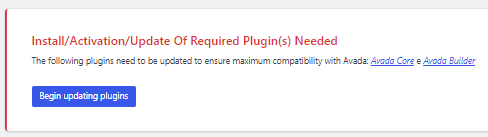
Thank you for the feature update @raz0r!

However, the plugins (builder and core) are missing.
Could you please make them available? Thank you very much!

1751992580765.png
 
Last edited:
Reacted by:
Thank you for the feature update @raz0r!

However, the plugins (builder and core) are missing.
Could you please make them available? Thank you very much!

Note: The latest current plugins I have installed are version 7.12.1

View attachment 51542
Install through the installer.
 
raz0r 's signature
Reacted by:
  • Like
Reactions: nexion
Install through the installer.
Thanks for the reply!I did exactly that, and I'm still getting the alert related to the plugins.
I went back to version 7.12.1, I'll do some more testing on the weekend.
 
Reacted by:
AVADA 7.14 Update Nulled + Plugins

Avada | Website Builder For WordPress & eCommerce - Business Corporate
Live Preview

Avada 7.14 is live! This version introduces Avada Conditional Rendering for all Avada Elements, new image upload options for WebP and AVIF media formats, direct flex alignment editing for Avada Nested Columns, Avada Conditional Rendering and Dynamic Data Endpoints for user metadata, preview options for the Avada Forms Upload Field, and so much more.

Installed annd tested (for educationnal purposes onnly)

  1. install theme by uploadingn zip file directly
  2. uncompress last_extra
  3. install core and builder plugins the normal way
  4. extra plugins included (premium)
  5. apply patch files inn order: top to bottom
  6. 423476Nov. 13, 2025Fixes form submission issue with AJAX nonce method, and backend builder notification setup issue.Download
    423480Nov. 13, 2025Fixes dynamic data image or SVG image not being loaded in some cases.Download
    423495Dec. 9, 2025Fixes webP / AVIF conversion issues related to different MIME types.
  7. After You’ve Downloaded the Patch File..​

    ..here’s what to look for.
    • Patch File Name – The patch file will be a .zip file with the patch’s number as its name which looks like this.
    • Extract – Now that you’ve found your patch file, extract the .zip file.
    • Locating the Patched Files – The extracted folder will be the same path you’ll need to follow to find the files on your site for applying the updated files. It will start from the wp-contents folder and end with your actual fixed files which looks like this.
    • Upload Fixes – Now access your site through FTP and navigate to the same location your patched files were found in the patch download. Transfer your new patched files (and only the files themselves) to the directory and choose to “overwrite” the existing files.
  8. if you need some templates.... if I have time.....

enjoy
 

Attachments

  • Avada.zip
    10.3 MB · Views: 21
  • avada_last_extra.zip
    37.3 MB · Views: 20
Reacted by:
  • Like
Reactions: ViktorGugo
AVADA 7.14 Update Nulled + Plugins

Avada | Website Builder For WordPress & eCommerce - Business Corporate
Live Preview

Avada 7.14 is live! This version introduces Avada Conditional Rendering for all Avada Elements, new image upload options for WebP and AVIF media formats, direct flex alignment editing for Avada Nested Columns, Avada Conditional Rendering and Dynamic Data Endpoints for user metadata, preview options for the Avada Forms Upload Field, and so much more.

Installed annd tested (for educationnal purposes onnly)

  1. install theme by uploadingn zip file directly
  2. uncompress last_extra
  3. install core and builder plugins the normal way
  4. extra plugins included (premium)
  5. apply patch files inn order: top to bottom
  6. 423476Nov. 13, 2025Fixes form submission issue with AJAX nonce method, and backend builder notification setup issue.Download
    423480Nov. 13, 2025Fixes dynamic data image or SVG image not being loaded in some cases.Download
    423495Dec. 9, 2025Fixes webP / AVIF conversion issues related to different MIME types.
  7. After You’ve Downloaded the Patch File..​

    ..here’s what to look for.
    • Patch File Name – The patch file will be a .zip file with the patch’s number as its name which looks like this.
    • Extract – Now that you’ve found your patch file, extract the .zip file.
    • Locating the Patched Files – The extracted folder will be the same path you’ll need to follow to find the files on your site for applying the updated files. It will start from the wp-contents folder and end with your actual fixed files which looks like this.
    • Upload Fixes – Now access your site through FTP and navigate to the same location your patched files were found in the patch download. Transfer your new patched files (and only the files themselves) to the directory and choose to “overwrite” the existing files.
  8. if you need some templates.... if I have time.....

enjoy
It didn't work for me ...
 
Reacted by:
Top