- License Information
- License: No license is needed.
Copyright: HelloTech55
- Developer
- HelloTech55
Download Password:
This integration can be done in any CMS or site without breaking the existing CMS or site.
It is fully responsive, modern design, premium look & feel, very beautiful and attractive with a nice professional design.
Files Included
1. index.html (HTML Code)
2. hellotech-tkt-mdl.css (CSS Code)
3. hellotech-tkt-mdl.js (JS Code)
4. Logo (Logo)
How to Integrate
1. Download & Extract
2. Make changes to the following:
<link href="/assets/css/hellotech-tkt-mdl.css" rel="stylesheet"> (CSS Code)
src="/assets/images/helloTech55-logo-919x919.png" (Your Logo)
src="https://yoursite.com/forms/ticket?styled=1&with_logo=1" (Backend Form from any backed Server)
<script src="/assets/js/hellotech-tkt-mdl.js"></script> (JS Code)
Refactor(Optional): "HelloTech55" & "hellotech55" in "css, js & html code" as per your need
3. Now integrate it in your CMS or sites by following the below steps:
a. Paste "HTML Body Code without <body> tag" in your custom html input field.
or in any page you want to integrate
b. Import external CSS & JS in your custom html header for CSS files & custom JS footer for JS files.
or simply import in any page where you want to import
c. Done!
Tip: It doesn't break your existing class names & ID names since it's using the unique class names & ID names even for global.
Credit: HelloTech55
Integrate External Backed Forms Easily With URL in Any CMS/Sites
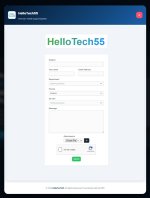
This is a small (HTML + CSS + JS) code-containing project (rather, an integration) to integrate any external forms (e.g., contact form, booking form, appointment form, or anything) using just the "URL." This integration can be done in any CMS or site without breaking the existing CMS or site.
It is fully responsive, modern design, premium look & feel, very beautiful and attractive with a nice professional design.
Files Included
1. index.html (HTML Code)
2. hellotech-tkt-mdl.css (CSS Code)
3. hellotech-tkt-mdl.js (JS Code)
4. Logo (Logo)
How to Integrate
1. Download & Extract
2. Make changes to the following:
<link href="/assets/css/hellotech-tkt-mdl.css" rel="stylesheet"> (CSS Code)
src="/assets/images/helloTech55-logo-919x919.png" (Your Logo)
src="https://yoursite.com/forms/ticket?styled=1&with_logo=1" (Backend Form from any backed Server)
<script src="/assets/js/hellotech-tkt-mdl.js"></script> (JS Code)
Refactor(Optional): "HelloTech55" & "hellotech55" in "css, js & html code" as per your need
3. Now integrate it in your CMS or sites by following the below steps:
a. Paste "HTML Body Code without <body> tag" in your custom html input field.
or in any page you want to integrate
b. Import external CSS & JS in your custom html header for CSS files & custom JS footer for JS files.
or simply import in any page where you want to import
c. Done!
Tip: It doesn't break your existing class names & ID names since it's using the unique class names & ID names even for global.
Credit: HelloTech55
- Password Protection?
- Yes